3 min read
Authentication Flow and API Design for Github Login
Overview
The optimal solution involves a combination of frontend and backend logic to handle the GitHub OAuth flow and secure your API endpoints. Here’s a step-by-step breakdown of the process:
- Frontend Initiates Login: The frontend will have a “Login with GitHub” button that, when clicked, redirects the user to the GitHub OAuth authorization page.
- GitHub OAuth Flow: After the user authorizes your application, GitHub will redirect back to your specified callback URL with a temporary code.
- Backend Handles OAuth Callback: Your backend (Cloudflare Worker) will exchange this code for an access token and verify the user’s identity.
- Session Management: Upon successful authentication, your backend will create a session and send a session cookie to the frontend.
- Frontend Uses Session Cookie: For subsequent API requests, the frontend will include this session cookie, which the backend will validate.
- API Authorization: Your existing
authMiddlewarewill check the session cookie for API requests.
Detailed Flow
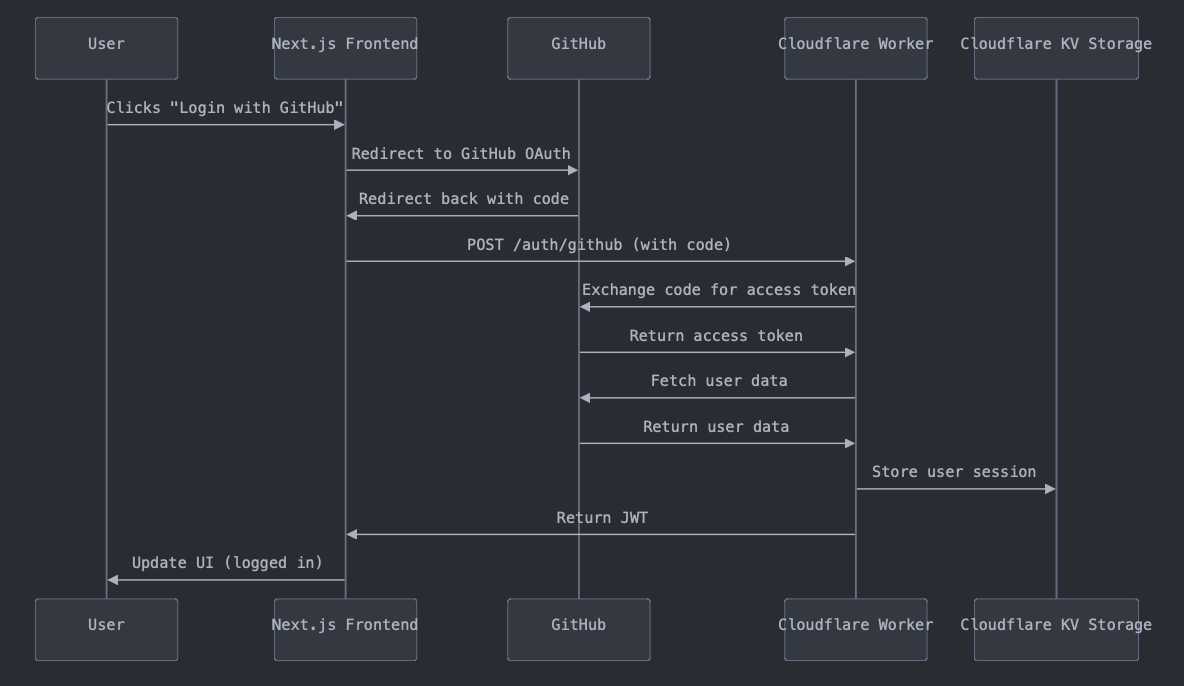
-
Frontend Login Initiation: When the user clicks “Login with GitHub”, redirect them to:
https://github.com/login/oauth/authorize?client_id=YOUR_CLIENT_ID&redirect_uri=https://s.haomin.tech/auth/callback -
Backend OAuth Callback: GitHub redirects to
/auth/callbackwith acodeparameter. Your backend exchanges this code for an access token. It then verifies the user’s identity and creates a session. -
Session Creation and Cookie Setting: After successful authentication, set a secure, HTTP-only cookie with the session ID. Redirect the user back to the frontend application.
-
Frontend After Login: The frontend should detect the successful login (e.g., by checking a specific route or query parameter). It can then update the UI to show the user as logged in.
-
API Requests: For all API requests, the frontend doesn’t need to do anything special. The browser will automatically include the session cookie. Your
authMiddlewarewill validate this cookie for each request.
API Design
-
Authentication Endpoints:
/auth/login: Redirects to GitHub (frontend uses this)/auth/callback: Handles OAuth callback (backend only)/auth/check: Returns current authentication status
-
URL Shortener API Endpoints:
POST /api/shorten: Create a new short URLGET /api/links: List all shortened linksPUT /api/links/:id: Update a linkDELETE /api/links/:id: Delete a link
-
Redirect Endpoint:
GET /:shortCode: Redirects to the original URL (no auth required)
Frontend Considerations
- Implement a login button that redirects to
/auth/login. - After redirect back from GitHub, check authentication status using
/auth/check. - If authenticated, show the URL management interface.
- If not authenticated, show the login button.
Security Considerations
- Use HTTPS for all communications.
- Set cookies with
SecureandHttpOnlyflags. - Implement CSRF protection if necessary.
- Regularly rotate session IDs to prevent session fixation attacks.
By following this design, you maintain a clear separation between frontend and backend concerns while leveraging your existing authentication middleware. The frontend handles the user interface and initiates the login process, while the backend manages the secure parts of the authentication flow and API authorization.